Management Console
Overview
The shopreme Management Console is the middleware between the retailers’ data and the shopreme DataHub. It allows users to view analytics, transaction information, and imported data about stores, products, and pricing.
The sections below will introduce each functionality and piece of information available on the shopreme Management Console, and the detail pages on the left side will provide more insights to help you understand how to make the best use of the tools offered by shopreme.
The information in this guide may vary based on your custom implementation or the version of your backend.
✨ You can always verify the version of your backend by clicking on “Version” in the bottom right corner of your Management Console view. The version includes the build date and the supported API levels for Mobile SDK, Supervisor, and matrix/vector.
Health dashboard
The Health Dashboard is the starting point of your daily system status check. Read more about it here.
Analytics section
Revenue analysis
The revenue analytics are based on revenue and transaction counts, which show the overall performance of the shopreme systems (Scan & Go and/or shopreme POS hardware). This data can be filtered per store and per device type.
More details can be found here.
In-store analysis
The in-store analytics are focused on the shopper activity within the stores. This relates to the client app they use, the payment process, the conversion rate, and the products they scan.
We show more examples and descriptions in our article here.
Supervisor analysis
The Supervisor Analysis section includes insights and KPIs related to shopper-employee interactions: waiting times and details about spot checks and age verifications.
Take a look at the detailed page about the Supervisor analysis and KPIs to see all the information.
User feedback
You can keep track of the user feedback from end customers using Scan & Go and other shopreme clients. Learn more about that in this article.
Payment section
Shopping sessions
In the shopping sessions section, you can see the ongoing and past sessions in your stores. Learn more about the shopping sessions and the details they include in the Shopping Sessions page article.
Transactions
The transactions section lists all payment activity in your shopreme server. A transaction is created when a shopper taps on “Pay” to either choose a payment method or pay immediately with a preselected one.
Check the full article here to learn all the details of what can be seen in each transaction details entry.
Hardware section
shopreme currently offers two specialized retail hardware devices that can streamline the Scan & Go journey.
Read more about shopreme vector here, the shopreme matrix here, and more details about portable scanners here.
shopreme vector management
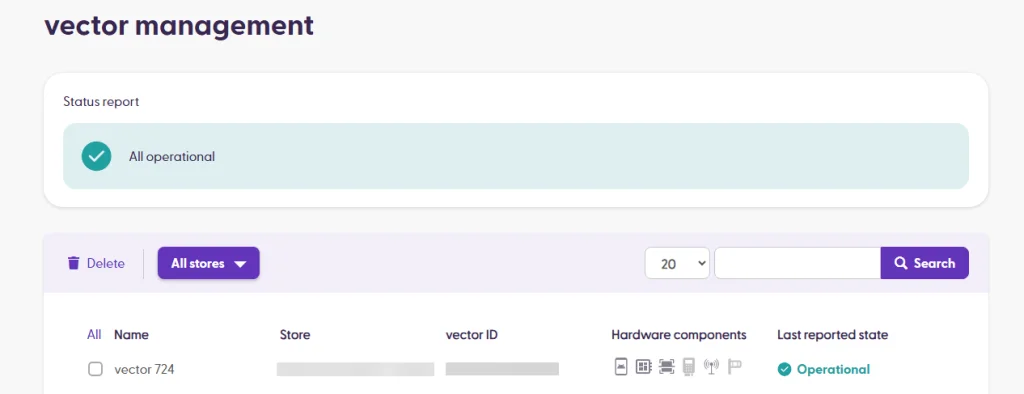
On the vector management page, you can see a list of all registered devices for your server. The list also shows the vector ID, whether there are add-ons such as an exit gate or a payment terminal, and the last-reported state (heartbeat sent by the vector to the shopreme backend).
At the top of the page, there is a “Status report” widget, which offers a summary of all devices’ states. It will be green if all devices are operational and working. If other statuses are available, they will be shown here. Clicking on the status will filter for all devices with that status.
Online devices:
Offline devices:
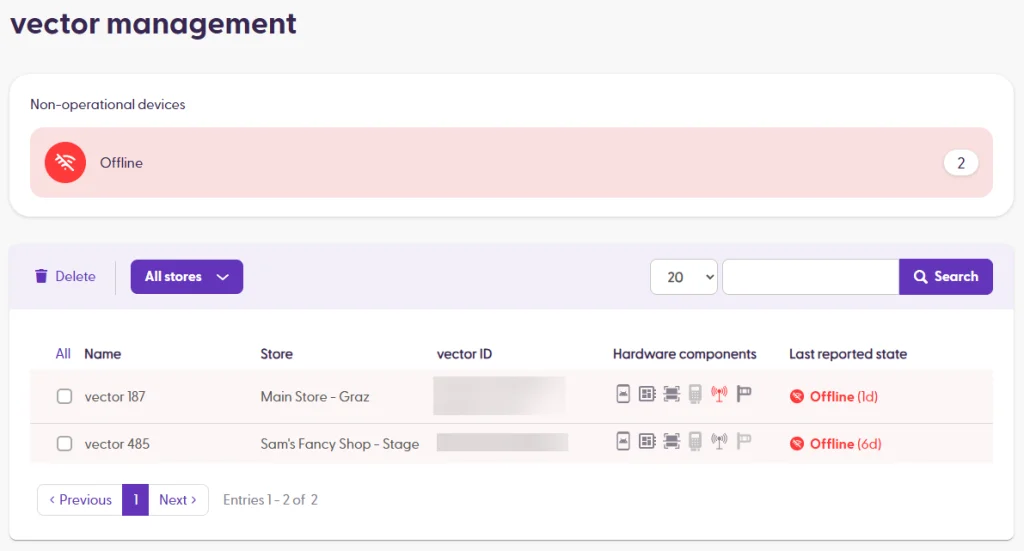
The common states here are:
Operational: Devices are stable, connected and working.
Offline: The last two heartbeats from a device were not received, so shopreme assumes the device is offline (either off or disconnected from the network).
Needs employee interaction: The device settings screen is open, or the employee is configuring the device.
Critical issue: A critical hardware component is not working or is not connected. Critical components are Scanner, nexus board, Payment Terminal (if it is a vector with payment) and the Ethernet connection.
Clicking on a device will open the vector detail page. You can learn more about the detail page here.
shopreme matrix management
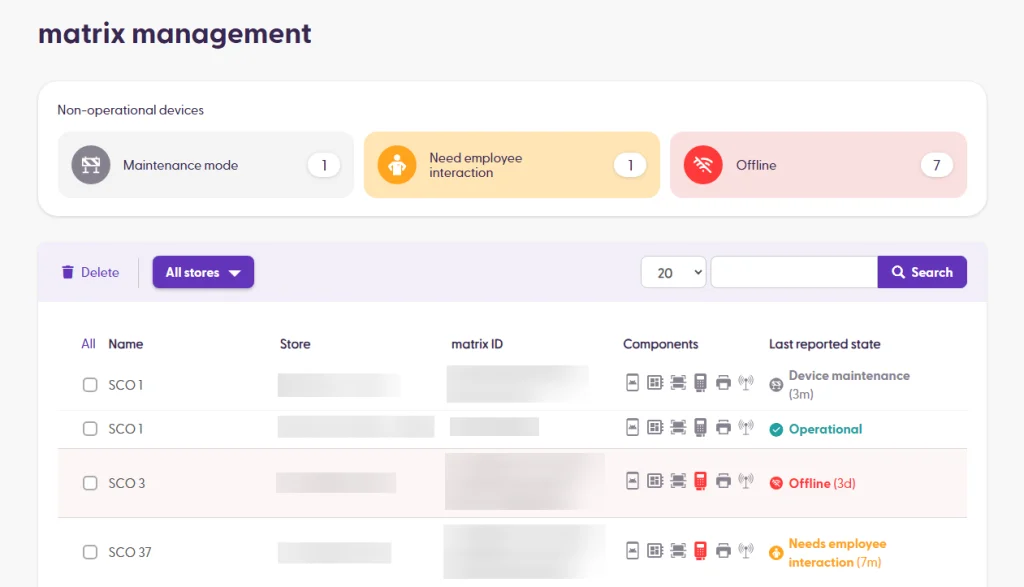
On the matrix management page, you can view all the matrix devices that are registered to your server. The list includes the device name, which is displayed on the Supervisor app, and also the Store name where it is located, the matrix ID (device serial number), the status of all critical components, and the last reported state of the device.
If a device requires attention (e.g., the printer is out of paper or the settings screen is open), it will be highlighted on the top widget with a different status.
The available statuses are:
Operational: All critical components are working, and the SCO is connected and ready to use.
Offline: The last two heartbeats from a device were not received, so shopreme assumes the device is offline (either off or disconnected from the network).
Needs employee interaction: The devices settings screen is open, or the employee needs to take action, .e.g., refill paper in the printer or set up the EFT (payment terminal) in a newly-configured matrix.
Maintenance mode: An employee enabled Out-of-Order manually on the device. Self-checkout is temporarily unavailable on the device, but otherwise the device is operational.
Critical issue: A critical hardware component is not working or is not connected. Critical components are Printer, Scanner, Payment Terminal, nexus board, and the Ethernet connection.
More details about the device can be seen by clicking on the entry to see the matrix details page.
Different device states:
You can learn more about the information on the matrix detail page here.
Portable scanners
The Portable Scanners section includes all shopreme-managed devices that can be set up in stores for customers to shop with using Scan & Go. These devices can be handheld scanners, such as the Zebra PS20 or PS30 devices, or the shopreme smart cart. The Unlocking Station is also included as part of the portable scanners system.
To see more details about the Portable Scanners management, read the “Portable scanner management” article. You can also see learn about the mobile apps for these portable scanners and their features, in the main “Handheld scanners” and "Smart cart" articles.
Beacons
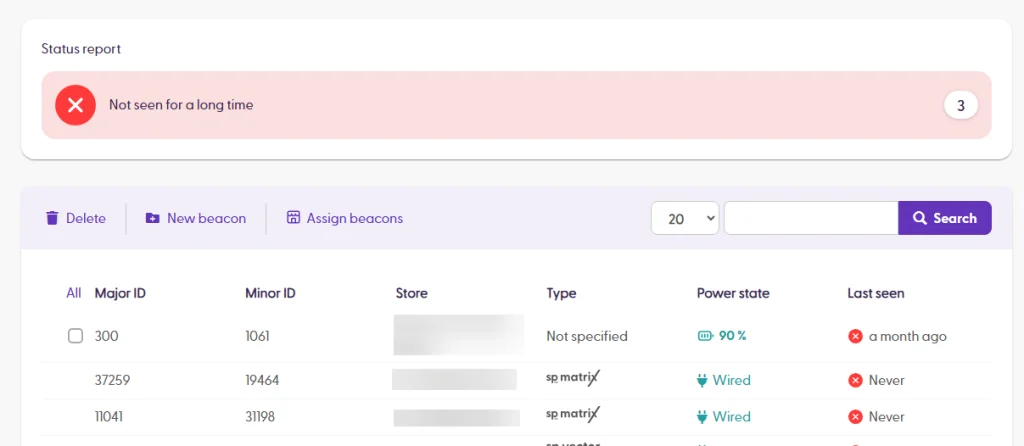
The shopreme store detection on the SDK is powered by BLE (Bluetooth Low Energy) beacons located in the stores. Whether you have individual beacons in the store location or beacons inside the vector or matrix devices, they will appear in this list.
Please note that only the individual beacons can be reassigned to a different store. The beacons that belong to a hardware device are bound to the location where the device is.
Stores
The Stores section lists all imported or manually-created stores in your server. Read more here.
Products
When clicking on the Products menu button, you will see the Product data list, with all imported or manually-created products in the database for this server. The products table shows the name and product number, and also allows you to select products and delete them, or manually create a product by clicking the option on the purple bar.
To see what products are available for scanning in a specific store, you can use the “Available in” dropdown search.
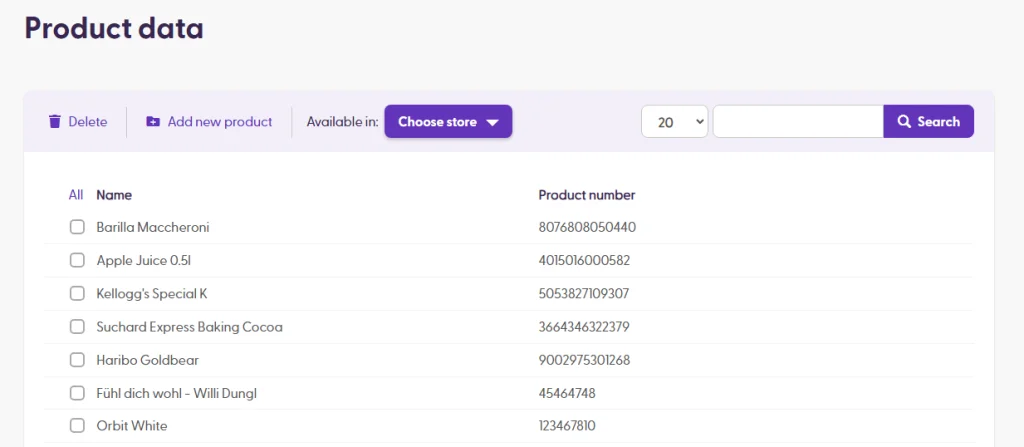
Clicking on a specific product entry will take you to the Product Detail page. You can learn more about the Details page here.
Product catalogue
The Product Catalogue helps retailers organize products into categories to make shoppers’ experience to find products much easier. These categories are used for the matrix category browsing and the “no-barcode search” in the SDK (if enabled).
You can read more details about this feature and how use it in this article.
Users section
There are currently three types of “Users” in the Management Console:
Management Console users: Usernames allowed to access the Management Console and different pieces of information in there.
Supervisor App users: Usernames allowed to sign in to the Supervisor app for all stores or specific ones.
API Tokens: Tokens used for authentication when using the shopreme API described in the DataHub.
Please check this article to learn more details about each type of user and their roles and permissions.
DataHub section
Jobs
The shopreme DataHub jobs are a key component for a smooth integration for Scan & Go. The DataHub jobs work out of the box and allow retailers to import the following data:
Product import: Data about products, their characteristics, requirements, and details such as age restriction, theft protection, etc.
Price import: Data about each product’s prices for each store.
Store import: Data about each store and their location, external ID, etc.
Categories import: Data about categories, images representing them, and child categories.
Visit the following article for more details and insights on the shopreme jobs and how to use them best: shopreme Import Jobs.
API connector
In the API connector section, you can find the documentation for the shopreme APIs, specifically for your server. Please visit the DataHub documentation for more information, data flows, diagrams, and details.
In the Settings tab, you can set a username and password for the HTTP basic authentication and enable other services, such as an external basket evaluation service (under “Basket and pricing”).
You can see more in the Outbound API and Inbound API tabs.
Please note that enabling or disabling options on the Settings screen can break behaviors. We recommend only changing this in test environments (“Stage” server, for example) and never in Production unless you are sure about the changes.
Server settings section
Configuration parameters
As shopreme can be customized depending on each retailer’s needs, some of these changes are set up as parameters in the server.
These flags can vary depending on the features available on your server, but some examples are the following:
| Minimum probability value for a store with “low” spot check risk. Default: |
| Minimum probability value for a store with “medium” spot check risk. Default: |
| Minimum probability value for a store with “high” spot check risk. Default: |
| Whether age verifications are enabled as a whole or not. |
| Minimum number of products that is recommended to scan during a spot check rescan. |
| First-time customers will not be selected for a spot check. |
| Self-verification using biometrics on the smartphone device is allowed for the server. |
| A default value for products VAT. |
Remember that the parameters and their values depend on your custom implementation and other customizations. The values above are only an example.
If you have specific questions about the parameters in your server, don’t hesitate to contact your shopreme Integration Consultant.
