Infrastructure
Network infrastructure
Infrastructure diagrams
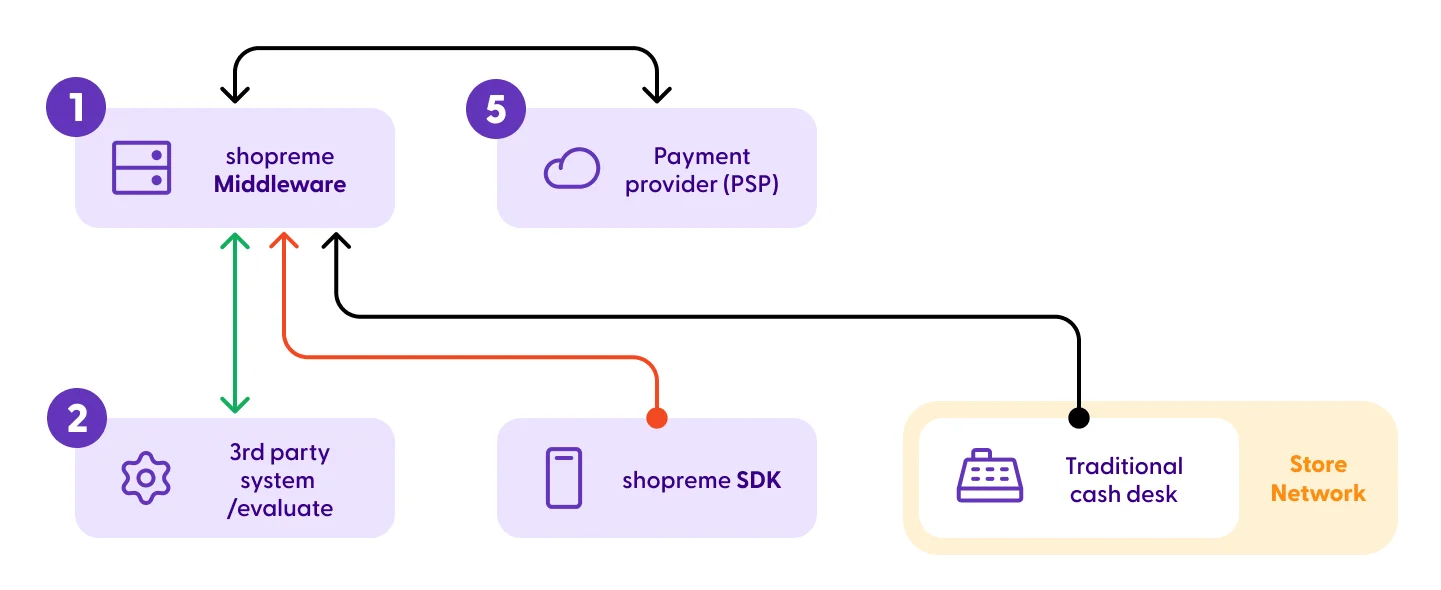
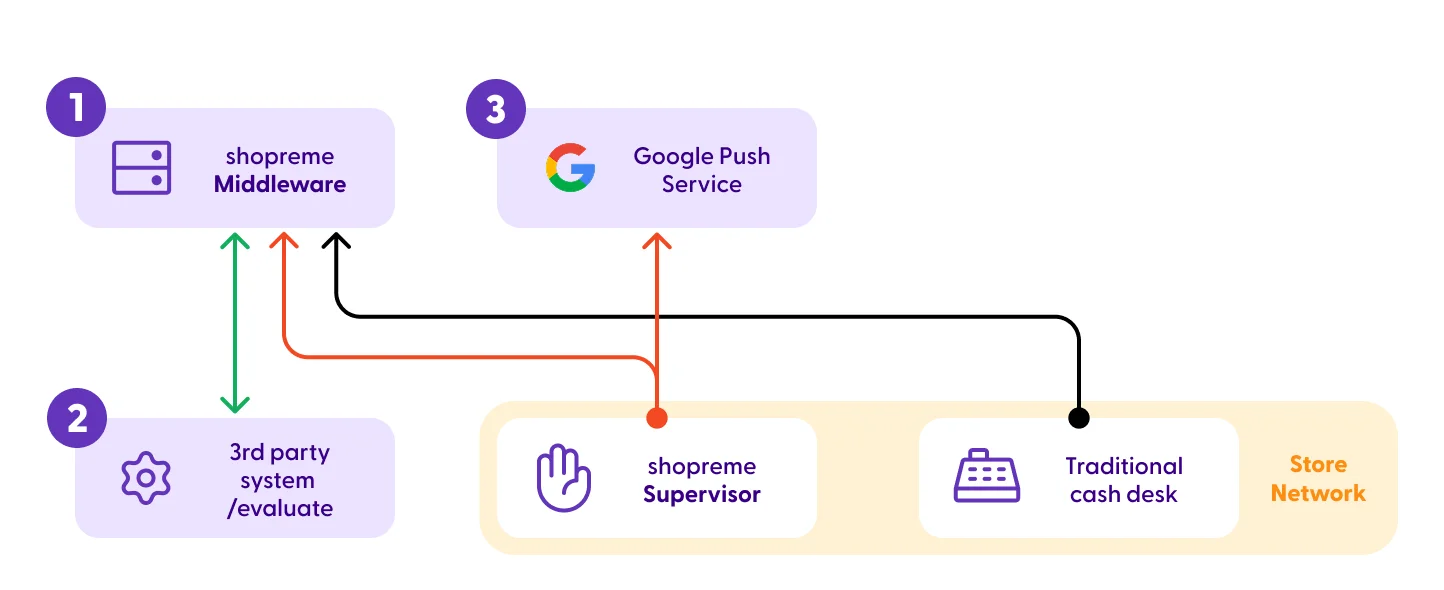
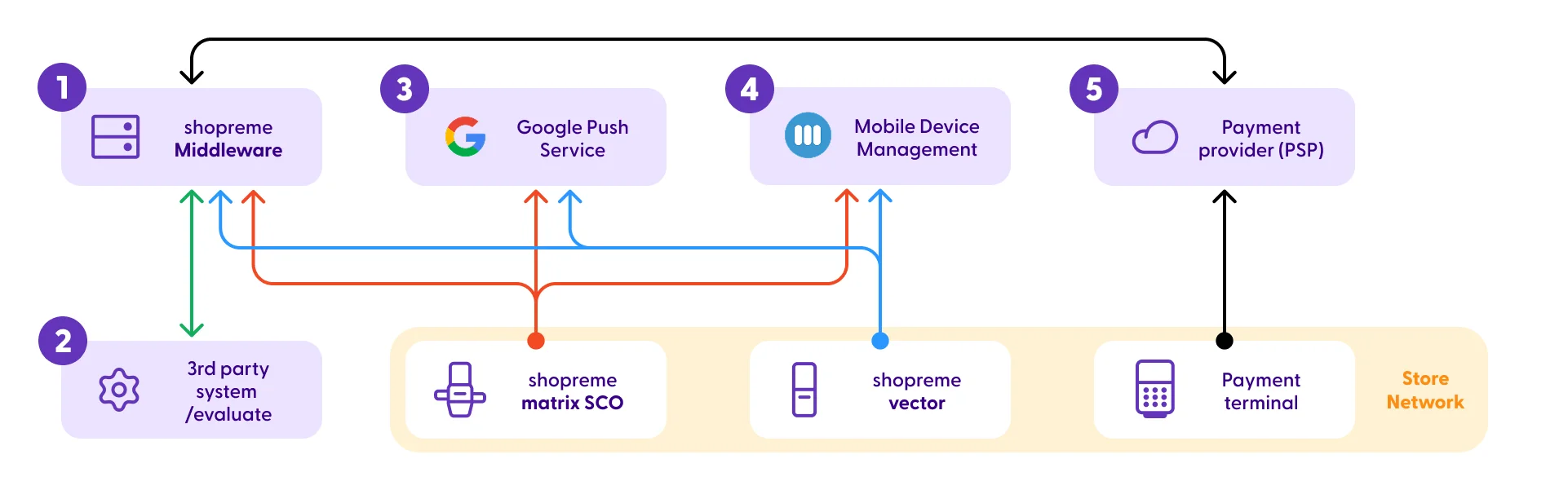
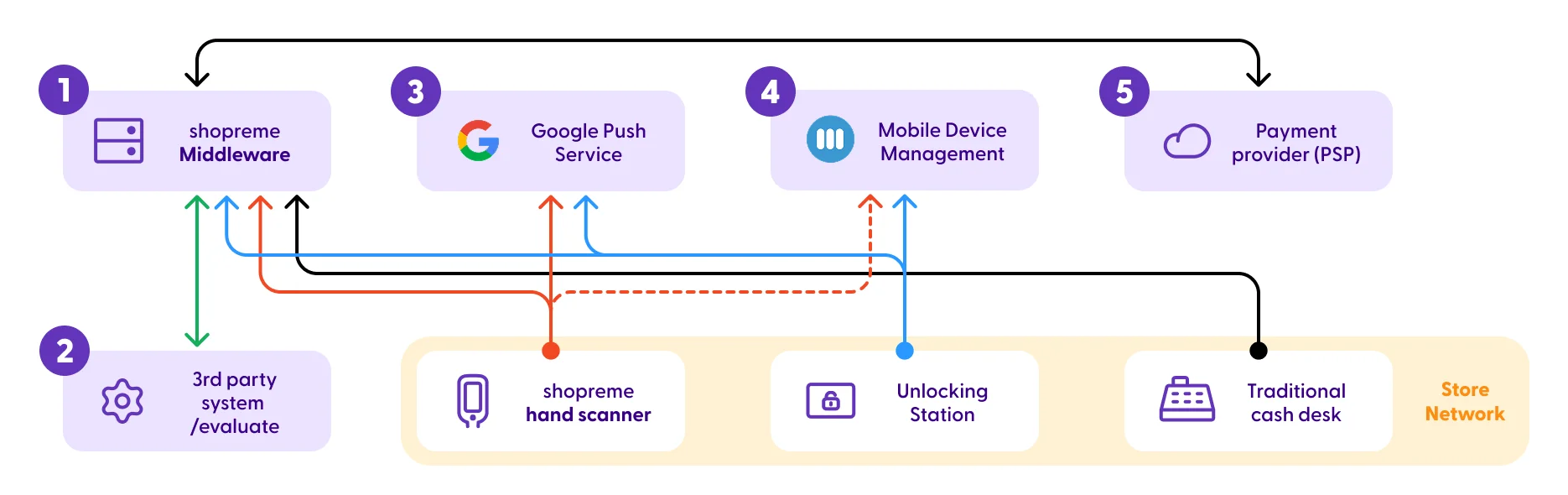
These diagrams visualize the required (or optional, with dashed lines) connections between components of the shopreme ecosystem and external services. Each service is numbered with the following references:
shopreme Middleware: The shopreme backend acts as middleware to handle requests to third-party services, such as payment providers. This means that the shopreme apps do not communicate directly to a payment provider (e.g. Adyen) but to the shopreme backend, which in turn handles the payment logic.
3rd party system: Some retailers may use 3rd party systems to handle the price calculation, add promotions, or issue receipts. These services are grouped into this category.
Google Cloud Messaging (Push Service): Google Push notifications are used to notify client apps about events, such as the Supervisor notifications for Spot Check or Age Verifications, or the Unlocking action for hand-held scanners.
Mobile Device Management: shopreme currently uses Miradore MDM to remotely manage Android devices, such as the matrix SCO and vector exit. An MDM allows shopreme to push app updates and other over-the-air customizations.
Payment service provider: A payment service provider, or PSP, is a third-party company that allows businesses to accept electronic payments, such as credit card and debit card payments. PSPs act as intermediaries between shoppers, who make payments, and retailers, who accept them. This integration is only necessary when handling on-device digital payments.
Infrastructure: SDK + Cash desk
Infrastructure: Supervisor app
Infrastructure: matrix SCO + vector exit
Infrastructure: Hand scanners system
Infrastructure: Smart carts system

Network connections for in-store hardware
Below is the table with all required DNS domains or IP addresses that need to be allowed in a retailer’s network for the matrix SCO, vector, snap cart, and handheld scanners to work as expected.
Attention: The IP addresses in the table only apply for shopreme customers with a European server hosting. If your server is hosted in a different region, please contact your shopreme integration consultant.
The number of each item refers to the numbers also used in the diagrams above.
If whitelisting the domain is not possible and you need a specific IP address, you will receive it from your shopreme integration consultant once the system is set up.
Certificates:
Let’s Encrypt, auto-renewed every 3 months
# | Communication | IPs / Domain | Ports |
|---|---|---|---|
1 | Reaching shopreme middleware | Production: Please allow the DNS domain <yourservername>.shopre.me | 80, 443 |
2 | shopreme middleware → Customer | Production: please contact your shopreme integration consultant. | 80, 443 |
3 | Google Cloud Messaging (Push service) | Google highly recommends allowing ports instead of IP addresses. | 5228 |
4 | Miradore MDM | Please refer to the Miradore | 443 |
5 | Payment Terminal → PSP | Please refer to the Documentation | Please refer to the documentation |
Bandwidth usage for different client types
Bandwidth usage for shopreme Smart Carts
The main bandwidth consumption of the smart cart is building the image cache and downloading the offline SKU database. This can be done either while the device is used or at a specific time of day (typically outside opening hours).
The highest level of data usage involves downloading the offline export once per day (~10MB depending on the number of SKUs), which is done outside opening hours. The smart cart fleet will spread the download of the offline export file over 1 hour to avoid straining the store network with a lot of concurrent traffic.
Once the images have been cached, a shopping session on the smart cart containing 30 products takes only about 500kB. A shorter session with only 10 products may only use 250kB. We obtained these results by testing on a stage environment with realistic product data. The test sessions included 10-30 products with some retail media content.
Upload in kB | Download in kB | |
|---|---|---|
Average per shopping session with ~30 products | 120 | 250 - 500 |
Offline SKU export Loaded once per cart per day | — | 10000 |
Retail media (flyer PDF, images & ad content) Loaded on demand or at a specified time – typically once per day | –– | 0 - 5000 |
Please note that actual usage may vary depending on the retail media content. Videos, dynamic web-based games or other web-based content may increase bandwidth requirements.
Bandwidth usage for shopreme matrix SCO
The following values can illustrate the bandwidth usage for matrix SCO devices in stores.
We obtained these results by testing locally at the shopreme office. The data transfer load via Ethernet can vary slightly depending on how much the devices are used throughout the day and whether the product images are large.
Upload in kB | Download in kB | |
|---|---|---|
Average per shopping session with 10 products | 819 | 1360 |
Offline SKU export Loaded once per day per SCO | — | 10000 |
Retail media (idle screen content) Loaded on demand or at a specified time | — | 0 - 5000 |
