Inbound API
Pay at cash register (v1)
This API enables integration with physical cash registers, so that the cash register can:
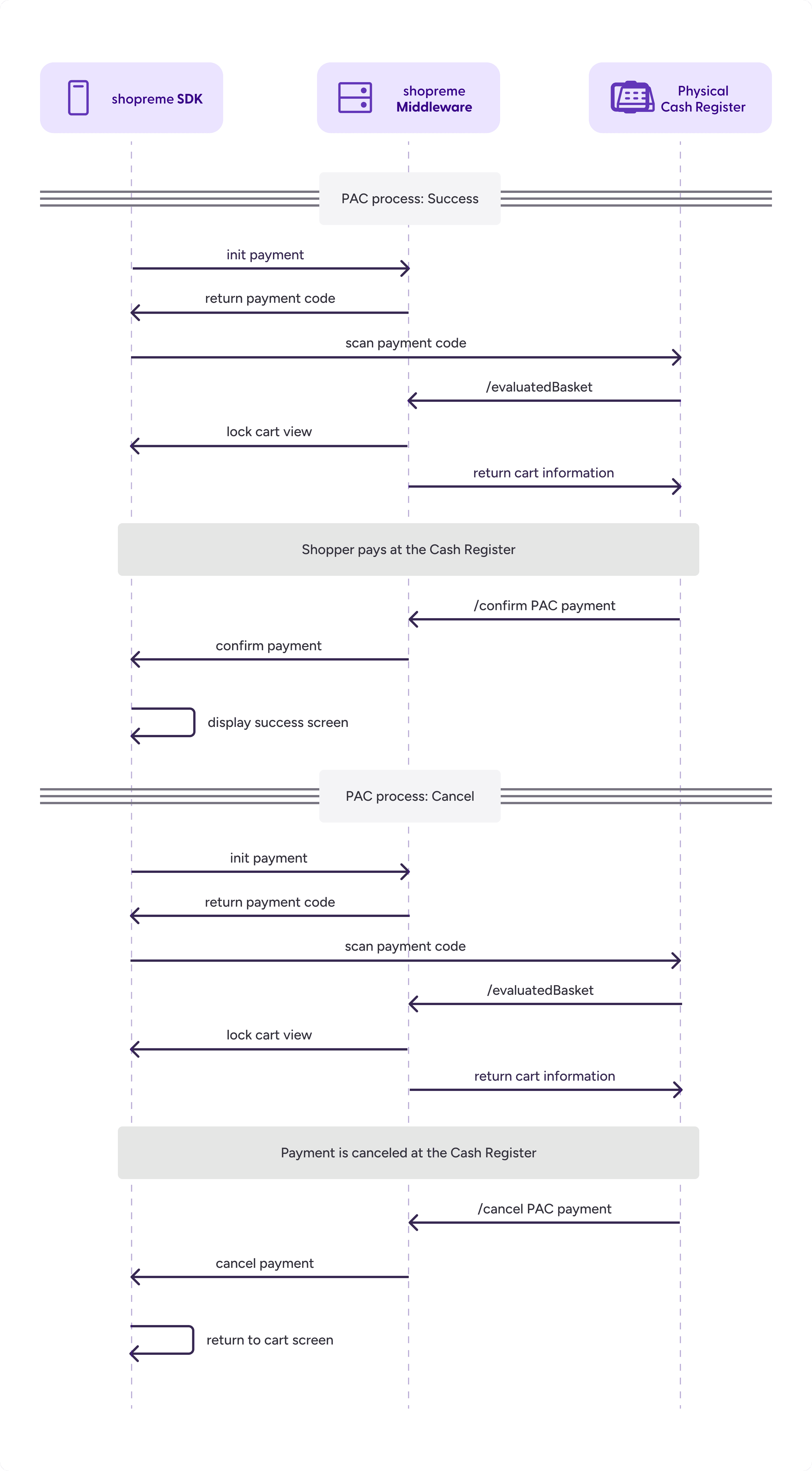
Retrieve the basket data (i.e., scanned products, coupons, loyalty information) via a scanned code from the Scan & Go app (typically the shopreme
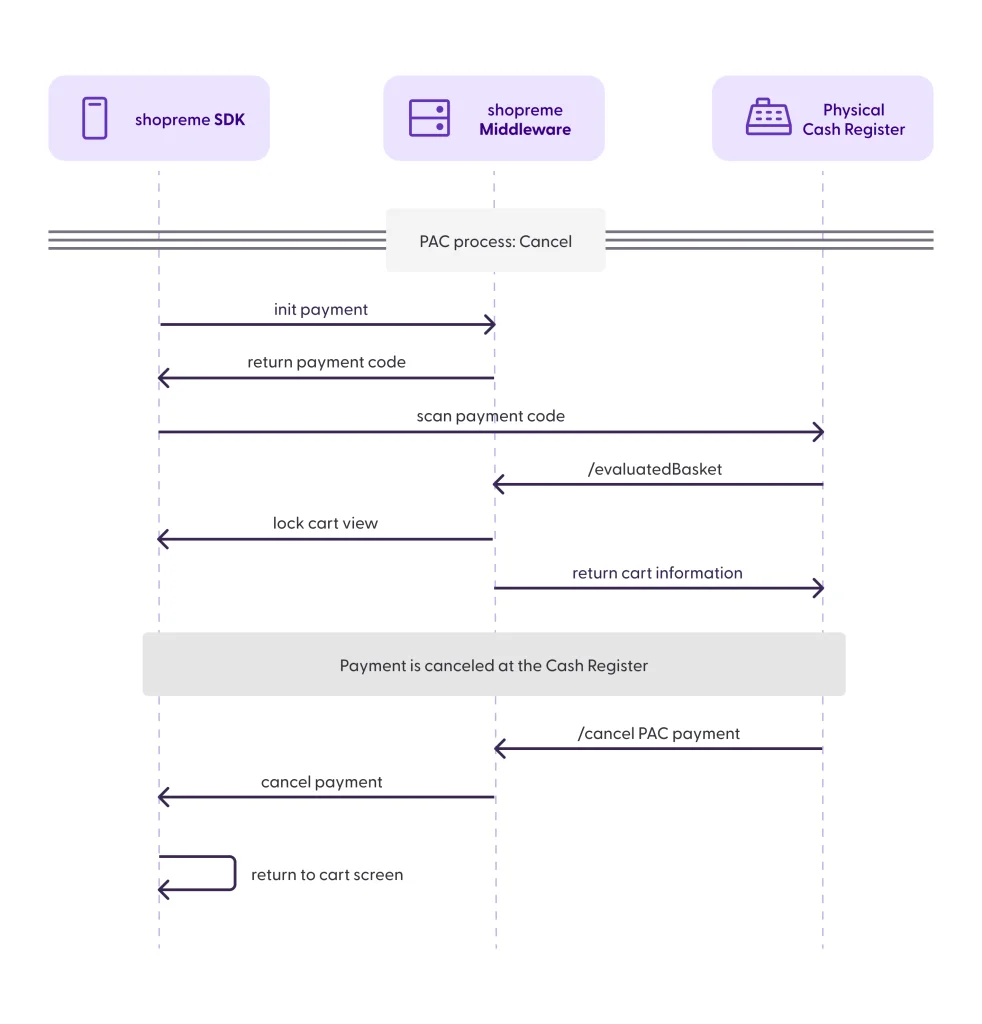
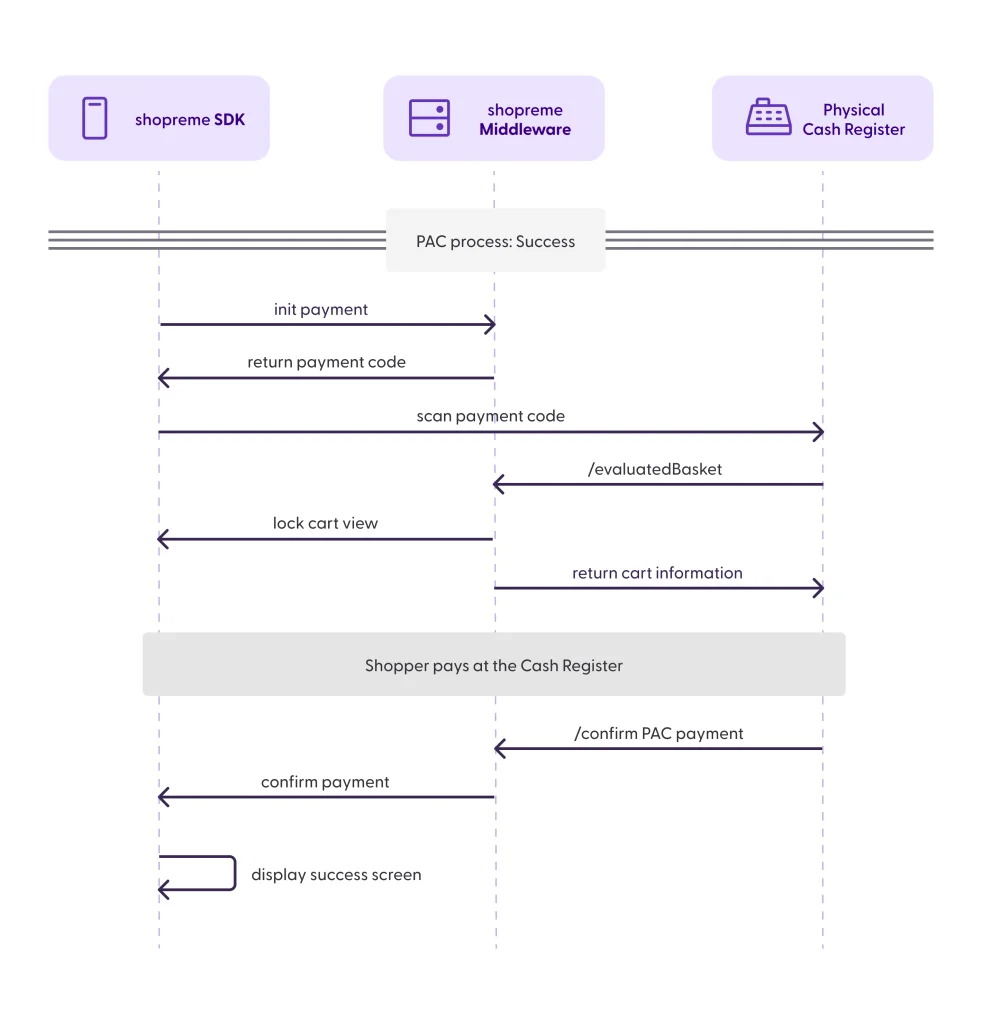
transactionid).Inform shopreme about the outcome of the payment process (confirmed payment or cancellation). Once the cash register loads a shopper basket, the Scan & Go app enters a lock state and awaits confirmation or cancellation via these endpoints.
Ensure that the shopreme DataHub is accessible from your cash register before using this API.
/evaluatedBasket
API documentation can be found here.
Loads the final contents of a basket for a given transactionId. In shopreme contexts, we call this the “basket handover” to the cash register. This includes basket positions, prices per position, loyalty data, applied coupons, and the calculated total to pay.
After calling this endpoint, the Scan & Go app will enter a lock state, which prevents modifying the basket. The shopper will see the screen “follow the cash register instructions”. This UI mode will persist until either /confirm or /cancel is called.
ℹ️ Note: The basket handover screen in the client apps shows a QR code with the shopreme transactionId encoded in it. This code can be identical to the spot check screen on the client apps, because the spot check code also encodes the transactionId in it. Even though the Scan & Go app shows a different screen and a different description, it is possible that distracted customers scan the spot check code at the cash register. This highlights the importance of handling the selectedForSpotCheck flag carefully, as it could allow shoppers who were selected for a spot check to pay for a basket and leave the store, if it is not handled properly.
Since this endpoint also contains prices provided by external pricing service in the /evaluate response, those prices could be used on the cash register. If possible, shopreme strongly encourages API users to perform a final price calculation on the cash register before the payment.
/unevaluatedBasket
API documentation can be found here.
Loads the contents of a basket for a given transactionId, which can be subject to changes at the cash register. In shopreme contexts, we call this the “basket handover” to the cash register. This includes basket positions, loyalty data, applied coupons, and the calculated total to pay. This endpoint does not provide prices, and the cash register must provide them during /confirm.
After calling this endpoint, the Scan & Go app will enter a lock state, which prevents modifying the basket. The shopper will see the screen “follow the cash register instructions”. This UI mode will persist until either /confirm or /cancel is called.
ℹ️ Note: The basket handover screen in the client apps shows a QR code with the shopreme transactionId encoded in it. This code can be identical to the spot check screen on the client apps, because the spot check code also encodes the transactionId in it. Even though the Scan & Go app shows a different screen and a different description, it is possible that distracted customers scan the spot check code at the cash register. This highlights the importance of handling the selectedForSpotCheck flag carefully, as it could allow shoppers who were selected for a spot check to pay for a basket and leave the store, if it is not handled properly.
Payment /confirm
API documentation can be found here.
Confirms that the payment at the physical cash register has been completed successfully.
Once this request is processed, the shopper’s app transitions from the waiting screen to the success screen.
If the basket content was modified after the handover to the cash register (e.g., items added/removed after the /unevaluatedBasket call), the full updated basket including updated prices for all positions should be sent in the request body — even unchanged ones. If the /evaluatedBasket call was used, no cart modifications are allowed. If there are no modifications, the positions list can be null.
Sending the updated list of positions ensures that the shopper sees the correct total of products in the Success screen and in the receipts history, and it also ensures that analytics in the shopreme Management Console are accurate.
The positions in the request (from the cash register) do not need to match entries in the shopreme system.
Payment /cancel
API documentation can be found here.
This endpoint must be called if the payment process is canceled at the cash register.
Cancels a payment process that was initiated at the cash register after /unevaluatedbasketor /evaluatedbasket.
After the cancellation, the shopper is allowed to go back to the cart on the Scan & Go app and either retry the payment or select a different payment method.