Management Console
Health dashboard
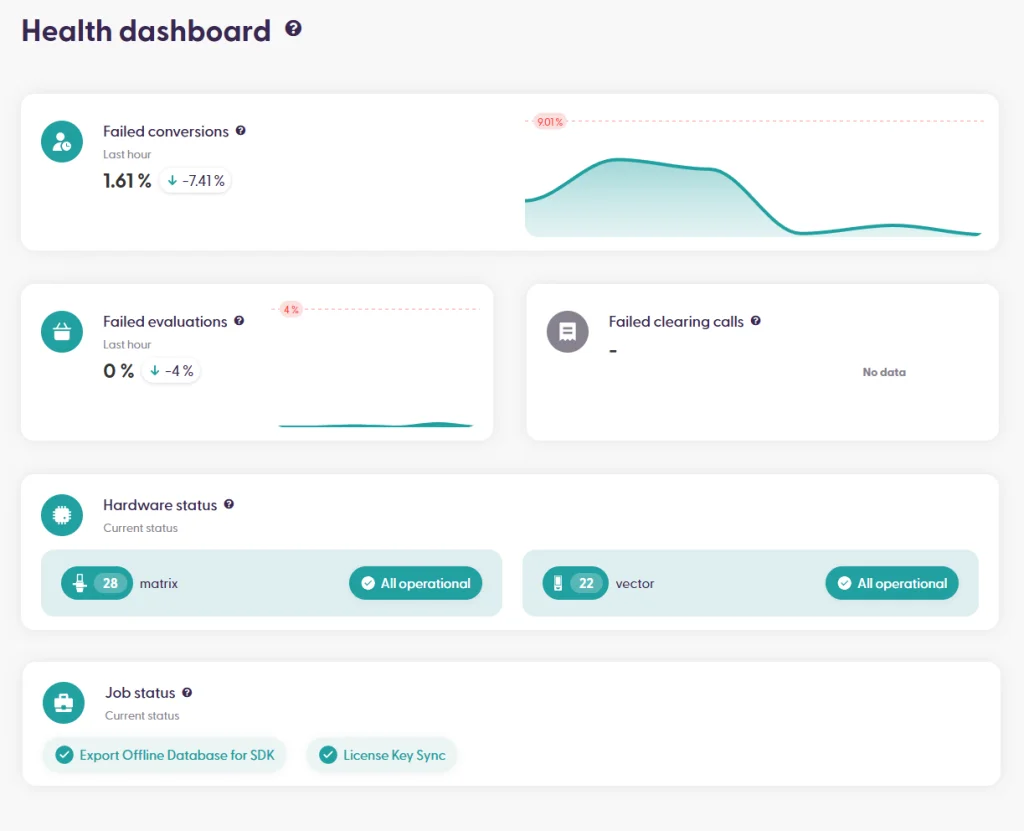
The Health Dashboard is part of the admin user experience to have a quick overview of the state of the servers, in-store activity, import jobs, and hardware – in one place. This section is in active development and improvement, so the view and features can vary depending on the version of your shopreme backend.
The widgets included in this overview are the following
Failed conversions: From the last hour to the current moment, what percentage of shopping sessions did not finish in a payment completed or session completed state. A high percentage can indicate technical difficulties in payment processing, product scanning, or any other puzzle piece needed for a successful checkout. A set minimum of simultaneous sessions is required to show a percentage.
Failed evaluations: During the last hour, what percentage of basket evaluation calls (API requests) gave an error response. This could signal an issue with a third-party engine or a product import, for example, if products cannot be recognized in the Scan & Go basket.
Failed clearing calls: Percentage of failed clearing calls in relation to the total number of clearing calls. This only works if you enable Live Clearing in your shopreme backend. For more information about this feature, please contact your shopreme Integration Consultant.
Hardware status: Total count of hardware units, either shopreme matrix SCO, vector exit, or portable scanners. If any hardware unit is not operational (either due to maintenance or a technical issue), this will be visible here. Clicking on the widget will lead to the filtered view of devices for some quick analysis.
Job status: This widget can be configured to show specific jobs that are important to monitor and ensure that the last run was successful. If any of those “watched” jobs fails during its last run, it will be highlighted in this section.