Employee solution: Supervisor app
Customers overview
On the home screen, you can see all the relevant activity in the store: Customers waiting for a verification, and all others using Scan & Go or shopreme SCOs.
Store overview
The “Other customers” bottom sheet enables you to see all Scan & Go activity to anticipate events or keep track of different shoppers’ needs. For example, you can see if shoppers have big shopping carts that will likely require to be verified, and you can see if any shopper has a restricted product in their cart.
The most important features to highlight:
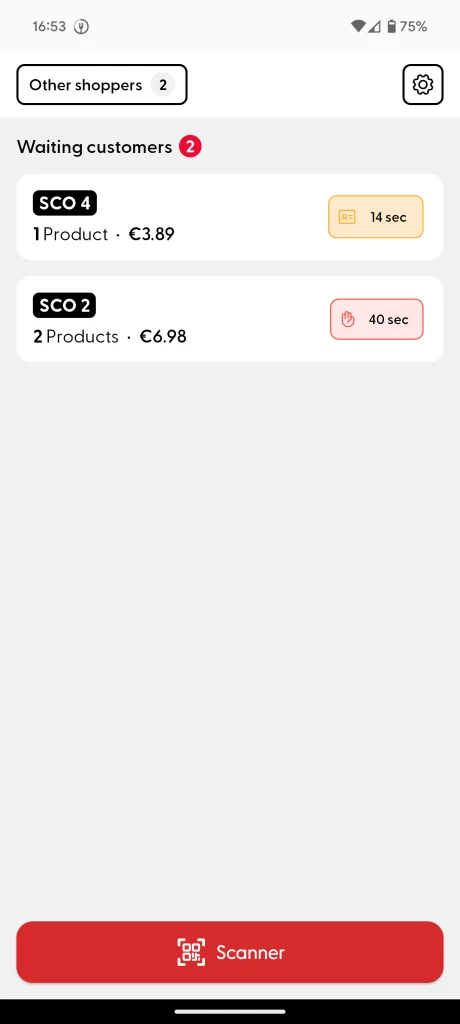
The Waiting Customers area only shows the shoppers who are currently waiting for an employee to assist them with their checkout.
All other shoppers are visible in the “Other customers” button, which opens the bottom sheet.
The green card badge next to the product quantity shows if the shopping cart has been paid.
The ID card badge (orange) shows that the shopper has an age-restricted product and will need to be age-verified.
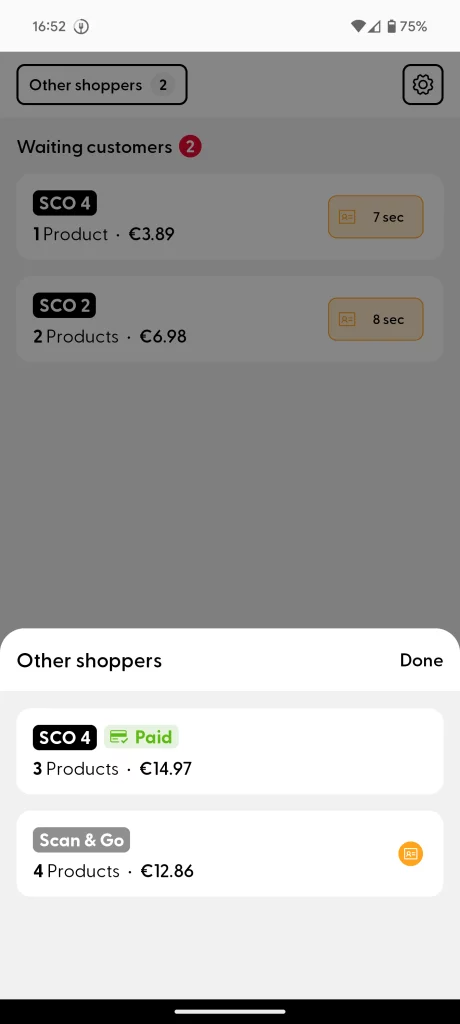
The red and orange boxes show the elapsed waiting time for the shopper. This time updates in real time.
The hand badge (Red) shows that a shopper is waiting for a security check (spot check).
To start a cart verification process, you can tap on the corresponding card and see the currently available actions.
Calls to action
At this time, the two possible calls for action are the Age Verification and the security Spot Check. If these customer checks are enabled for your store, please visit the following articles that explain in detail how this process works from the customer and the employee point of view: Age Verification, Spot Check.
