Management Console
Stores page
The Stores section lists all imported or manually-created stores in your server. Usually, stores are within the same country for tax and management reasons.
To create a store manually, click ”New store” in the Stores view and fill in the details. There are some required fields:
The “name” is the display name shown in transactions and other parts of the Management Console.
The “External ID” is linked to product and price imports and can also be used for basket evaluation and external payment processing. It should be a unique ID that identifies the specific store.
The “Address” is used to display the store in the map on the Dashboard section.
In addition, the Store entry shows the available Features:
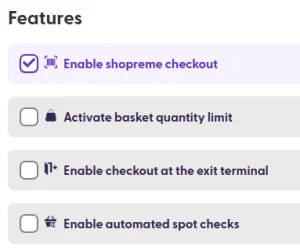
Features to select in a new store
Enable shopreme checkout: Checking this box allows shoppers to detect the store via Bluetooth in the Scan & Go app or use the matrix SCO if available, scan products, pay for them, and leave the store. Disallowing this option will tell shoppers that Scan & Go is unavailable in the store when they open the app.
Enable checkout at the exit terminal: This option enforces that a QR code be displayed on the shopper Scan & Go app to be scanned at the vector to be able to leave the store. The QR code can be used to open the gate at the vector, if available.
Activate basket quantity limit: This option sets the maximum allowed number of items to be purchased per transaction.
Enable automated spot checks: This option enables the spot check algorithm to select shoppers randomly for basket verification. A store risk level should be selected, which sets a pre-defined probability (default: low = 5%, medium = 10%, high = 15%).
Please note that the store information can also be imported via the store import job. See the DataHub > Jobs section for more details.
If you have specific questions about the parameters in your stores' configurations, don’t hesitate to contact your shopreme Integration Consultant.
